 e8fbfb14c1
Add coexistence checks to all enqueue methods to prevent loading
both React and Grid.js assets simultaneously.

Changes:
- ReactAdmin.php: Only enqueue React assets when ?react=1
- Init.php: Skip Grid.js when React active on admin pages
- Form.php, Coupon.php, Access.php: Restore classic assets when ?react=0
- Customer.php, Product.php, License.php: Add coexistence checks

Now the toggle between Classic and React versions works correctly.

Co-authored-by: Claude Opus 4.7 <noreply@anthropic.com>
GradientPicker
GradientPicker is a React component that renders a color gradient picker to define a multi step gradient. There's either a linear or a radial type available.
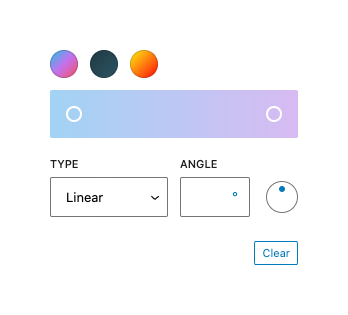
Usage
Render a GradientPicker.
import { useState } from 'react';
import { GradientPicker } from '@wordpress/components';

const myGradientPicker = () => {
	const [ gradient, setGradient ] = useState( null );

	return (
		<GradientPicker
			__nextHasNoMargin
			value={ gradient }
			onChange={ ( currentGradient ) => setGradient( currentGradient ) }
			gradients={ [
				{
					name: 'JShine',
					gradient:
						'linear-gradient(135deg,#12c2e9 0%,#c471ed 50%,#f64f59 100%)',
					slug: 'jshine',
				},
				{
					name: 'Moonlit Asteroid',
					gradient:
						'linear-gradient(135deg,#0F2027 0%, #203A43 0%, #2c5364 100%)',
					slug: 'moonlit-asteroid',
				},
				{
					name: 'Rastafarie',
					gradient:
						'linear-gradient(135deg,#1E9600 0%, #FFF200 0%, #FF0000 100%)',
					slug: 'rastafari',
				},
			] }
		/>
	);
};
Props
The component accepts the following props:
className: string
The class name added to the wrapper.
- Required: No
value: string
The current value of the gradient. Pass a css gradient like linear-gradient(90deg, rgb(6, 147, 227) 0%, rgb(155, 81, 224) 100%). Optionally pass in a null value to specify no gradient is currently selected.
- Required: No
- Default:
linear-gradient(90deg, rgb(6, 147, 227) 0%, rgb(155, 81, 224) 100%)
onChange: ( currentGradient: string | undefined ) => void
The function called when a new gradient has been defined. It is passed the currentGradient as an argument.
- Required: Yes
gradients: GradientsProp[]
An array of objects of predefined gradients displayed above the gradient selector.
- Required: No
- Default:
[]
clearable: boolean
Whether the palette should have a clearing button or not.
- Required: No
- Default: true
disableCustomGradients: boolean
If true, the gradient picker will not be displayed and only defined gradients from gradients are available.
- Required: No
- Default: false
__nextHasNoMargin: boolean
Start opting into the new margin-free styles that will become the default in a future version, currently scheduled to be WordPress 6.4. (The prop can be safely removed once this happens.)
- Required: No
- Default:
false
headingLevel: 1 | 2 | 3 | 4 | 5 | 6 | '1' | '2' | '3' | '4' | '5' | '6'
The heading level. Only applies in cases where gradients are provided from multiple origins (ie. when the array passed as the gradients prop contains two or more items).
- Required: No
- Default:
2
asButtons: boolean
Whether the control should present as a set of buttons, each with its own tab stop.
- Required: No
- Default:
false
loop: boolean
Prevents keyboard interaction from wrapping around. Only used when asButtons is not true.
- Required: No
- Default:
true